
Integrate
0. 最新 ADX iOS SDK 版本
Version 2.8.2
Release Date : 2025/11/10
1. 最低支持规格
从 2025 年 4 月 24 日起,上传到 App Store Connect 的应用必须使用 Xcode 16 或更高版本进行构建。 https://developer.apple.com/kr/news/
从 ADX iOS SDK 2.7.1 版本开始,如果 iOS 应用项目的 info.plist 文件中包含 "AppLovinSdkKey" 键,应用启动后将会在 Xcode 控制台输出以下错误信息并导致异常终止,因此需要将其移除。 [AppLovinSdk] ERROR [ALSdk] Invalid initialization process: please remove the AppLovinSdkKey entry from your Info.plist and set your SDK key with the ALSdkInitializationConfiguration object. Then initialize the SDK as soon as possible with -[ALSdk initializeWithConfiguration:completionHandler:] before accessing any SDK fields or APIs.
2. 添加 ADX iOS SDK
1) 1)打开项目的 Podfile,并添加以下内容。
# 添加库下载源
source 'https://github.com/adxcorp/AdxLibrary_iOS_Release.git'
source 'https://github.com/CocoaPods/Specs.git'

# 部署目标版本 (Deployment Target Version)
platform :ios, '13.0'

# 添加 ADX 库(横幅、原生、插屏、激励)
pod 'ADXLibrary', '2.8.1'

# ADX Lite version
pod 'ADXLibrary/Lite', '2.8.1'

# 在 Xcode 15.0 及以上版本,如果出现与 TOOL CHAIN 相关的构建错误,请添加以下代码。
post_install do |installer|
  installer.pods_project.targets.each do |target|
    target.build_configurations.each do |config|
    xcconfig_path = config.base_configuration_reference.real_path
    xcconfig = File.read(xcconfig_path)
    xcconfig_mod = xcconfig.gsub(/DT_TOOLCHAIN_DIR/, "TOOLCHAIN_DIR")
    File.open(xcconfig_path, "w") { |file| file << xcconfig_mod }
    end
  end
end2) 使用以下命令安装库,并找到扩展名为 .xcworkspace 的文件并打开。
pod install --repo-update3. Project Setting
1) 在项目的 Build Settings 中,将 Enable Bitcode 修改为 No。

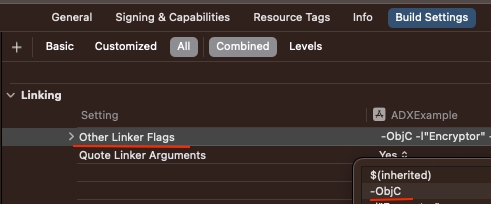
2) 在 Xcode > Build Settings > Other Linker Flags 中,如果使用 "-all-load" 或 "-force_load" 标志进行构建,可能会发生符号重复 (Symbol Duplicate)。在这种情况下请改为使用 "-ObjC" 标志。
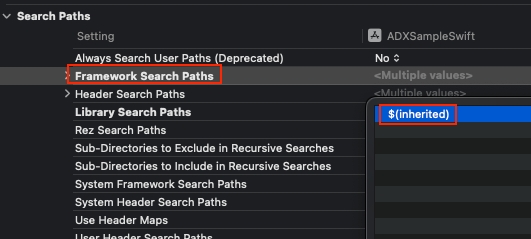
3) 选择构建目标后 > Build Settings > Framework Search Paths 中确认是否已添加 "$(inherited)" 值,如果未添加则可能出现找不到相关库的构建错误,请务必添加。
4. iOS 14+ 支持
如果支持 iOS 14+ ATT(App Tracking Transparency) Framework,则需要应用以获取 IDFA (Identifier for Advertisers) 标识符。详细方法请参考以下链接。
App Tracking Transparency5. 设置 AdMob APP ID
在
Info.plist文件中,添加GADApplicationIdentifier键和已发放的 AdMob APP ID。如果未添加
GADApplicationIdentifier,则会在Xcode控制台 中显示以下消息,并导致应用异常退出。The Google Mobile Ads SDK was initialized incorrectly.<key>GADApplicationIdentifier</key> <string>ADMOB_APP_ID</string>
最后更新于
这有帮助吗?